⌨️
A layout for each keyboard
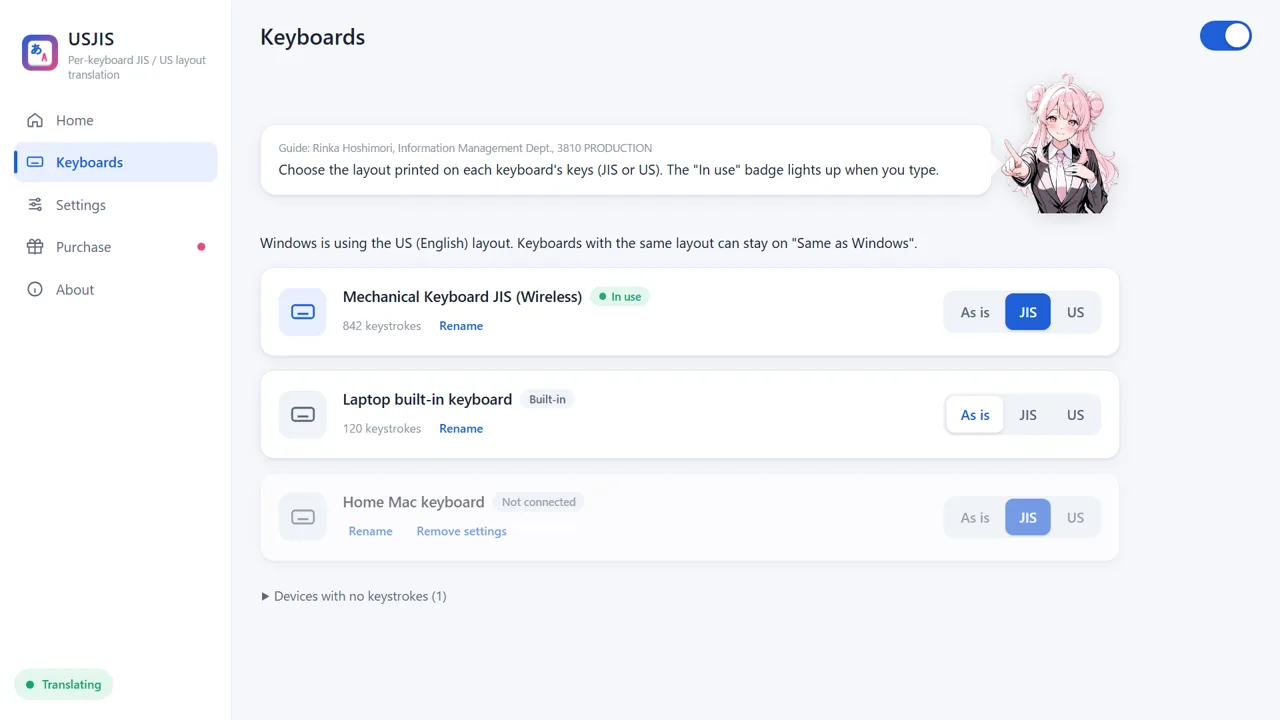
Choose JIS, US or "Same as Windows" for each keyboard. Symbols such as @ and : come out exactly as printed on the keys.
A Japanese (JIS) external keyboard on a laptop with a US keyboard, or the other way around: USJIS lets every keyboard type exactly what is printed on its keys.
Windows only lets you choose one keyboard layout. USJIS tells your keyboards apart and translates keystrokes to match each keyboard's own layout. Your Windows settings stay as they are.

GUIDE
Hello! I'm Rinka Hoshimori from the Information Management Department at 3810 PRODUCTION. When you first start USJIS, I'll help you set it up. Just type something on the keyboard you want to use, and I'll find it. Then choose the layout printed on its keys: JIS or US.
FEATURES
Choose JIS, US or "Same as Windows" for each keyboard. Symbols such as @ and : come out exactly as printed on the keys.
USJIS recognizes each keyboard and remembers its setting, even after you unplug it or restart your PC.
Your Windows hardware keyboard layout setting is left untouched. Turn USJIS off and everything works as before.
On a US-layout Windows, the Hankaku/Zenkaku, Henkan, Muhenkan and Katakana/Hiragana keys of a JIS keyboard work just as they do on a JIS-layout Windows.
Use the Eisu and Kana keys on Apple keyboards to turn Japanese input off and on. On US keyboards, you can also tap Alt to switch.
If anything looks wrong, press Ctrl+Shift+F12 to stop translation immediately. You can also pause it from the tray icon.
HOW TO USE
LIMITATIONS
PRICE
FAQ
Q. Is anything I type sent anywhere?
No. USJIS never stores or sends what you type. It only goes online to check your trial and purchase, sending just a hashed ID that identifies your PC and the app version.
Q. How is this different from switching the keyboard type in Windows Settings?
The Windows setting applies one layout to every connected keyboard. USJIS sets the layout per keyboard, so JIS and US keyboards can both be connected and used as printed at the same time, without restarting.
Q. Will my keyboard stop working when the trial ends?
No. Only the translation stops, and your keyboards work according to your Windows settings. Purchase USJIS to turn translation back on right away.
Q. Can I use it on another PC?
One purchase covers up to 3 PCs. Enter the license key shown when you purchased on the "Purchase" screen of USJIS on the other PC.
Q. Is there a Mac version?
USJIS is for Windows. macOS already remembers the layout (JIS, US and so on) for each keyboard, so there is no Mac version.
DOWNLOAD
| OS | Windows 10 / Windows 11 (64-bit) |
|---|---|
| Also needed | Microsoft Edge WebView2 Runtime (included with Windows 10 / 11) |
| Layouts | JIS (Japanese) and US (English), including Apple JIS and US keyboards |
| Languages | Japanese and English |
| Price | 7-day free trial, then USD 9.99 one-time (tax not included). JPY 500 in Japan (tax included) |
| Distribution | Microsoft Store |
SUPPORT
Windows and Microsoft Edge are trademarks of Microsoft Corporation. Apple is a trademark of Apple Inc. Logi Bolt and Unifying are trademarks of Logitech.
← Back to apps